Vector Logos: Why They're Essential
Everything you need to know about vector logos: differences from bitmap, SVG/AI/EPS/PDF formats, practical advantages, and how to get a vector version of your logo.
What Is a Vector Logo?
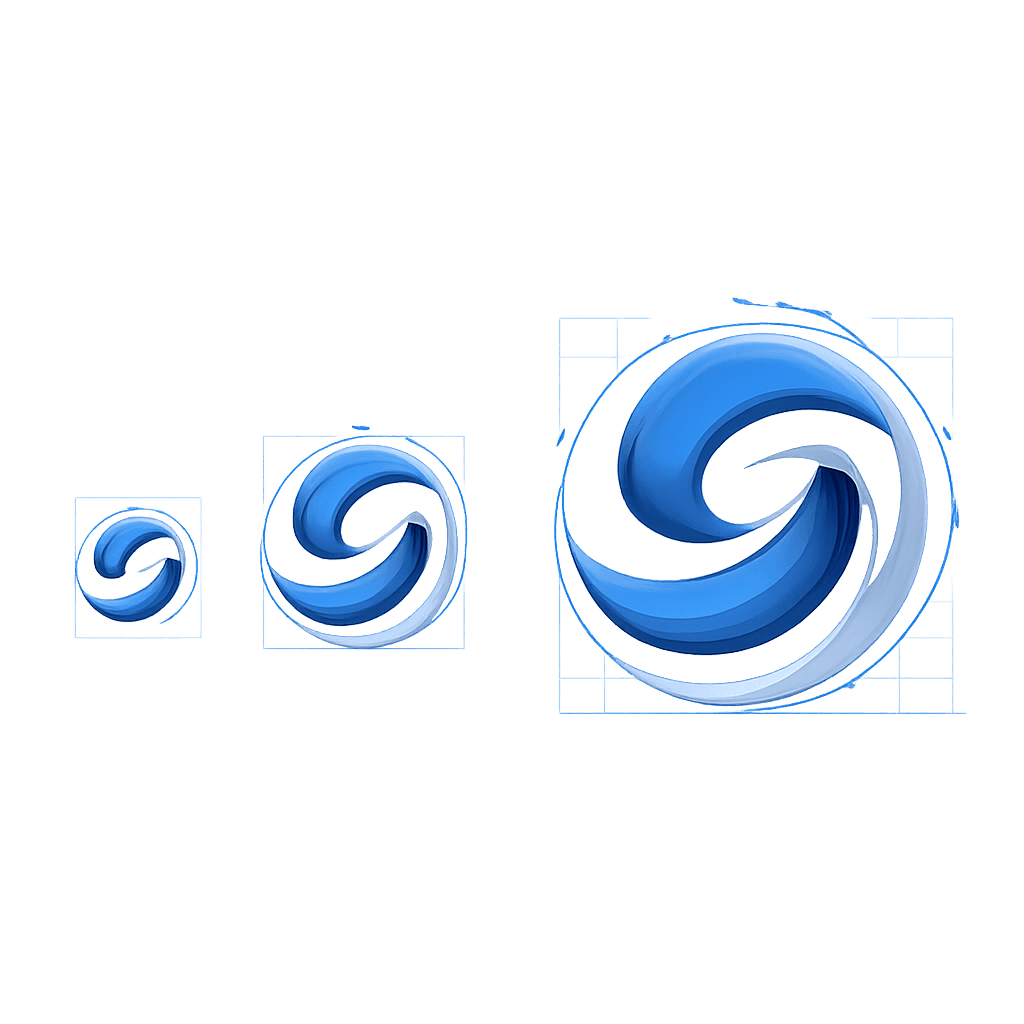
A vector logo is a logo created using mathematical formulas (vectors) that define points, lines, and curves. Unlike standard images (photos, PNG, JPEG) made up of pixels, a vector file can be scaled infinitely without any loss in quality.
Whether your logo is 16 pixels (favicon) or 16 meters (billboard), it will remain perfectly sharp and precise. This property is what makes vector format absolutely essential for any professional logo.
Vector vs Bitmap: The Key Difference
Bitmap (Raster) Images
Bitmap images (JPG, PNG, GIF, BMP, WebP) are made up of a grid of pixels. Each pixel has a defined color. When you enlarge the image, the pixels become visible: the image appears blurry, pixelated, and jagged.
Bitmap characteristics:
- Fixed resolution (e.g., 1000x1000 pixels)
- Quality degrades when enlarged
- Files are often heavy at high resolution
- Ideal for photographs and complex images
Vector Images
Vector images (SVG, AI, EPS, vector PDF) are composed of Bezier curves and mathematical formulas. They have no fixed resolution -- they're recalculated each time they're displayed.
Vector characteristics:
- Infinite resolution: no pixelation, ever
- Very lightweight files
- Colors and shapes are easily editable
- Ideal for logos, icons, typography, and illustrations
Why Your Logo MUST Be in Vector Format
1. Professional Printing
Business cards, flyers, posters, banners, vehicles... Printing requires high-resolution files. A 500x500 pixel PNG logo will look blurry on an A3 poster. A vector logo will look perfect at any size.
Professional printers systematically require vector files. Without them, you'll have to pay extra for vectorization, often with imperfect results.
2. Multi-Platform Adaptability
Your logo will appear across dozens of different media:
- Digital: website, social media, emails, apps
- Print: cards, brochures, packaging, labels
- Signage: storefront signs, panels, window graphics
- Merchandise: t-shirts, pens, mugs, USB drives
A single vector file lets you adapt your logo to all of these without any quality loss.
3. Lightweight Files
An SVG logo often weighs just a few kilobytes, compared to several hundred KB (or even MB) for a high-resolution PNG. On the web, this is a major advantage for your site's loading speed, which directly impacts your SEO rankings.
4. Easy Modifications
Need to change a color? Adjust a proportion? Adapt the logo for a partnership? With a vector file, these changes take just a few clicks. With a bitmap, each modification potentially degrades the quality.
5. Future-Proofing
Vector formats are stable industry standards. An AI or SVG file created today will be usable in 10, 20, or 50 years. It's a lasting investment for your brand.
Vector Formats You Need to Know
SVG (Scalable Vector Graphics)
Primary use: web and digital
Advantages: open standard, lightweight, compatible with all browsers, editable with CSS and JavaScript
Ideal for: logos on websites, icons, animations
AI (Adobe Illustrator)
Primary use: professional creation and editing
Advantages: Illustrator's native format, the most comprehensive for editing
Ideal for: the source file for your logo -- the one you keep safe
EPS (Encapsulated PostScript)
Primary use: professional printing
Advantages: compatible with nearly all desktop publishing software
Ideal for: sending your logo to a printer or vendor
PDF (Vector)
Primary use: sharing and printing
Advantages: universally readable, preserves vector data
Caution: not all PDFs are vector. A PDF can contain a bitmap image. Verify by zooming in -- if it pixelates, it's not vector.
How to Get a Vector Logo
When Creating Your Logo
This is the ideal time. When having your logo designed, always request vector files (SVG + AI or EPS). This is a professional standard that every designer should provide.
At Wilogo, delivered logos include vector files. It's an essential marker of professional quality.
If You're Using a Free Online Tool
Be careful: many free logo creation tools only provide PNG or JPEG files. SVG export is often reserved for paid versions. Check this before choosing your tool.
Can You Convert a Bitmap Logo to Vector?
Yes, this is called vectorization (or "tracing"). But be cautious about the results:
Automatic Vectorization
Tools like Illustrator's "Image Trace" feature or websites like Vectorizer.ai can automatically convert a PNG to SVG. Results are acceptable for simple logos, but often imperfect for complex designs: approximate curves, lost details, shifted colors.
Manual Vectorization
A designer redraws your logo by hand in vector format, faithfully recreating every curve and shape. This is the most reliable method but also the most expensive (typically $50-200).
Our advice: never start from a bitmap if you can avoid it. Invest in a vector logo from the start.
Software for Creating or Editing Vector Logos
- Adobe Illustrator: the professional standard, paid (Creative Cloud subscription)
- Figma: excellent for interface design and logos, free version available
- Inkscape: open-source and free alternative to Illustrator, very comprehensive
- Affinity Designer: professional alternative to Illustrator, one-time purchase (no subscription)
- CorelDRAW: a classic in vector design, popular in Europe
- Canva (Pro): allows SVG export with the Pro subscription
FAQ
How do I know if my logo is in vector format?
Check the file extension: .svg, .ai, .eps are vector formats. If you only have .jpg, .png, or .gif files, your logo is not vector. A simple test: zoom in to 500%. If the image pixelates, it's bitmap.
Can I use an SVG on my website?
Yes, and it's highly recommended! SVG is native to the web, lightweight, and crisp on all screens (including Retina and 4K). It's supported by all modern browsers.
Does a vector logo cost more?
No. Every professional designer works in vector by default. If a provider charges extra for vector files, that's a red flag. Vector files are part of any standard professional delivery.
What's the difference between SVG and transparent PNG?
A transparent PNG has a transparent background but remains a bitmap image (fixed resolution, pixelation when enlarged). An SVG is vector: it's transparent by default, infinitely scalable, and much lighter.
My printer is asking for a vector file -- what if I don't have one?
Two options: have your logo vectorized by a designer ($50-200), or have your logo recreated in vector format. If your logo is very simple, an automatic vectorization tool may work in a pinch, but carefully check the result.